tree-canopy
We forecast forest canopy change using a binary classification target:
High Canopy Growth – The classification compares forest canopy change between 2015 and 2019 (a 4-year period), and counties with a ≥5% increase are labeled as high growth (1), others as 0. Stable/Declining – All other counties.
Forest Canopy Change as Target
The target is produced by pipeline/canopy-process.py, which replaced the original Forest Canopy colab in October 2026. It pulls LandCoverFraction_Forest (“Percent of Forest Covered Area”, Copernicus-derived) for every U.S. county from the Data Commons API, keeps the most recent years, and writes two files:
input/targets/forest-canopy-timeseries-<first>-<last>.csv: one row per county (Fips,Name), one column per year, percent forest cover.input/targets/forest-canopy-target.csv:Fips,Target, whereTargetis 1 when relative growth between the first and last year of the window is at or above the threshold (5 percent by default), otherwise 0.
The earlier output, input/targets/forest_canopy_data_target.csv, was made once by the colab for 2015 to 2019 and is kept for the existing parameter files. The timeseries file that the RealityStream canopy parameters referenced was never generated by the colab; the script now produces it.
Run it
pip install datacommons-client pandas
python pipeline/canopy-process.py                    # last 5 available years, 5 percent threshold
python pipeline/canopy-process.py --years 4 --threshold 5
python pipeline/canopy-process.py --check            # offline self-check, no key needed
It needs DATACOMMONS_API_KEY (request one at apikeys.datacommons.org), read from the environment, the OS credential store (realitystream/api/keystore.md), or the .env named by automation/paths.yaml in the webroot.
Processing steps
- Fetch every observation of
LandCoverFraction_Forestfor entities of type County undercountry/USA. - Clean FIPS to 5-digit text, strip “ County” from names.
- Keep the last N available years (
--years), pivot to one row per county. relative_growth = (last - first) / first * 100;Target = 1whererelative_growth >= threshold.- Write both CSVs to
input/targets/.
View the timeseries on the timeline page (Data Commons variable LandCoverFraction_Forest). Models are run from the RealityStream Run Models page with the Forest Canopy parameters.
How It Works
The .csv file is used as a target input for ML models predicting forest canopy trends based on other features (e.g., economic activity).
You can plug this into any modeling workflow by referencing the parameter YAML described below.
🔎 Workflow Overview (with the CSV)
- Target Formation
- Extract U.S. county metadata via FIPS codes.
- Retrieve Copernicus-derived forest cover data.
- Calculate relative growth:
relative_growth = ((recent - start) / start) * 100 - Label counties as High Growth (1) or Stable/Declining (0).
- Mathematical Analysis
- Rank counties by canopy change.
- Identify top 10 counties per state with largest decreases.
- Preprocessing for EDA
- Clean FIPS codes, merge metadata.
- Drop unrelated features, handle missing values.
- Reshape data into long format for time-series models.
- Predictive Modeling
- Linear Regression (
sklearn) for trend fitting. - ARIMA (
statsmodels) for 5-year canopy forecasts. - Rolling-window validation used for robustness.
- Linear Regression (
- Statewise Pipelines
- Group counties by state for localized forecasting.
- Outputs structured for visualization.
- **Interactive Dashboard **
- Outputs structured for visualization.
- Added Gradio dashboard with dropdown menus for state + county selection.
- Interactive plots show forest canopy trends.
- Integrated maps display canopy growth/decline at the county level.
- Automatically highlights top 10 declining counties per state.
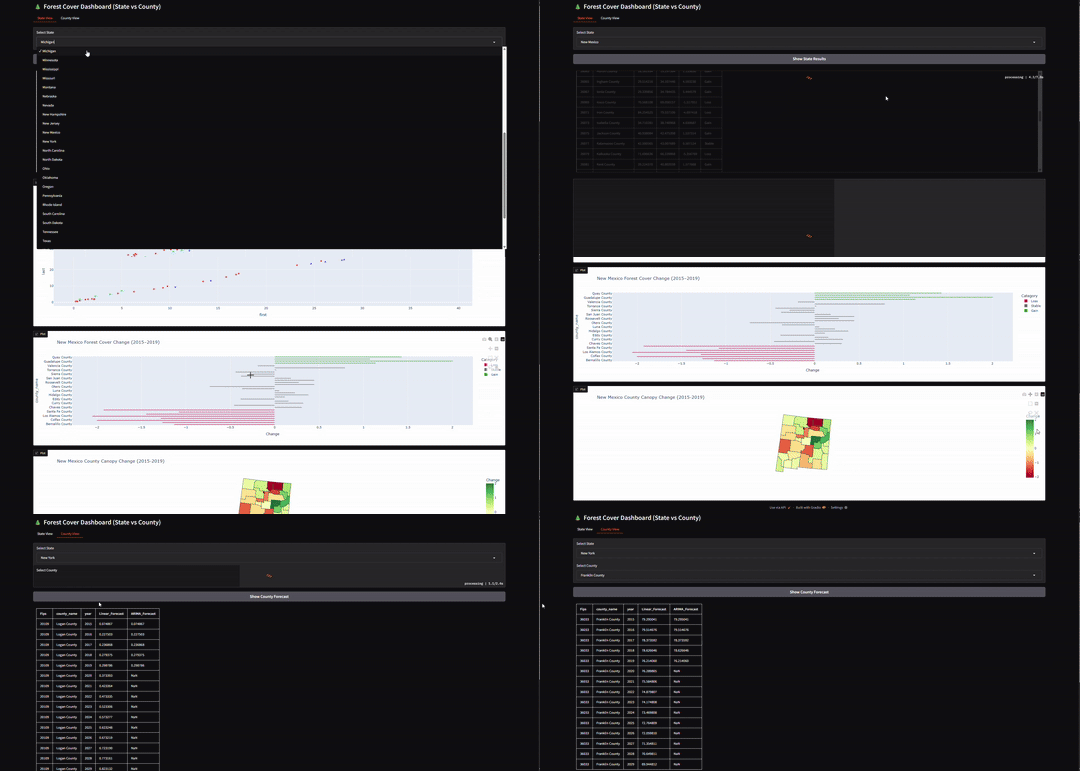
Target YAML Configuration
forest_canopy_config.yaml – YAML configuration for using this dataset as a model target.
```yaml folder: naics6-forestcanopy-counties-simple features: data: industries common: Fips path: https://raw.githubusercontent.com/ModelEarth/community-timelines/main/training/naics2/US/counties/2020/US-ME-training-naics2-counties-2020.csv targets: data: forest_canopy path: https://raw.githubusercontent.com/ModelEarth/tree-canopy/main/input/targets/forest_canopy_data_target.csv models: rbf